这篇文章上次修改于 1627 天前,可能其部分内容已经发生变化,如有疑问可询问作者。
准备
PVE使用的local与local-lvm逻辑卷local主要是 VZDump备份文件, ISO镜像, 容器模板local-lvm主要是 磁盘映像, 容器
因此我在这里选择扩充local-lvm,这里只有14G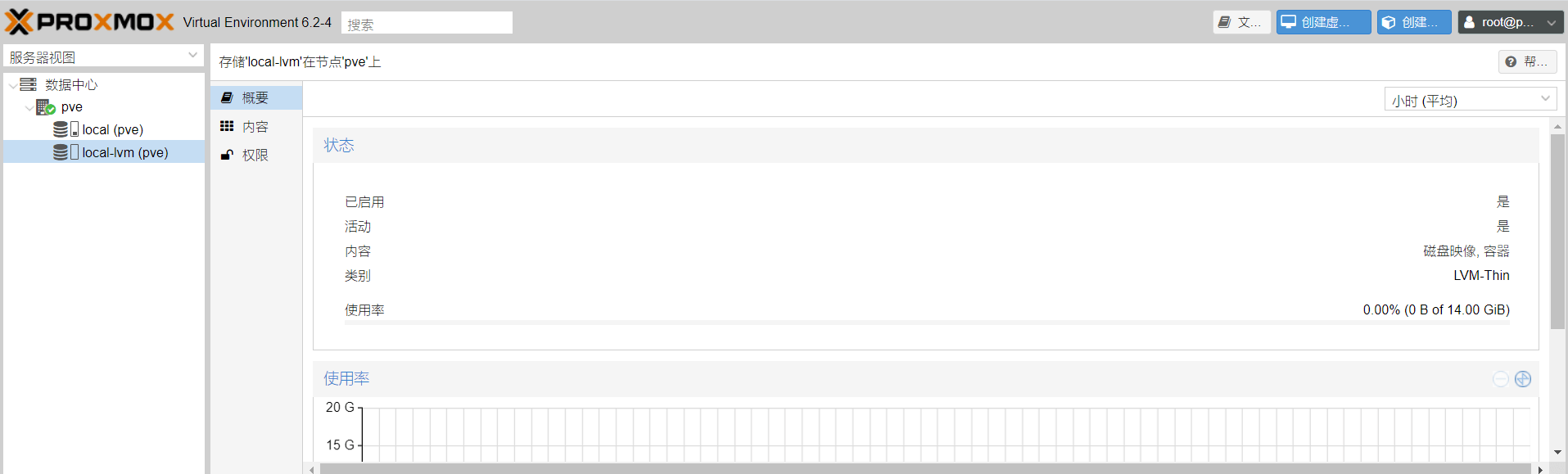
local-lvm扩容之前
1.使用xshell一类的软件通过ssh进入系统,ip是pve的ip,端口是22,用户名是root,密码是pve的密码
修复
有时候有提示警告才需要修复,没警告就不用
使用
fdisk -l可能会有红色提示:
GPT PMBR size mismatch (67108863 != 121634815) will be corrected by write.中文含义:GPT PMBR大小不匹配(67108863 != 121634815)将通过写纠正。
先修复这个提示:
执行
apt-get update
apt-get install parted
parted -l
emmm,按理说会在弹出Fix/Ignore?的提示
输入Fix后回车即可。
但是我这里没提示啊,大概是fdisk的bug吧,那就不管他了。
如果它提示需fix的话,输入fix然后回车就能自动修复了
扩容分区
请自己根据命令查到的路径进行相应操作,每个人的卷路径可能不一样
PVE使用的是LVM管理local 与 local-lvm 逻辑卷,因此需要先扩容最底层的分区
先安装需要的软件
apt-get update
apt-get install parted
1.执行
fdisk -l提示
GPT PMBR size mismatch (67108863 != 121634815) will be corrected by write.
Disk /dev/sda: 58 GiB, 62277025792 bytes, 121634816 sectors
Disk model: VMware Virtual S
Units: sectors of 1 * 512 = 512 bytes
Sector size (logical/physical): 512 bytes / 512 bytes
I/O size (minimum/optimal): 512 bytes / 512 bytes
Disklabel type: gpt
Disk identifier: 0C17A6FD-69E2-401F-97C8-209F38118AC9

Device       Start      End  Sectors  Size Type
/dev/sda1       34     2047     2014 1007K BIOS boot
/dev/sda2     2048  1050623  1048576  512M EFI System
/dev/sda3  1050624 67108830 66058207 31.5G Linux LVM


Disk /dev/mapper/pve-swap: 3.9 GiB, 4160749568 bytes, 8126464 sectors
Units: sectors of 1 * 512 = 512 bytes
Sector size (logical/physical): 512 bytes / 512 bytes
I/O size (minimum/optimal): 512 bytes / 512 bytes


Disk /dev/mapper/pve-root: 7.8 GiB, 8321499136 bytes, 16252928 sectors
Units: sectors of 1 * 512 = 512 bytes
Sector size (logical/physical): 512 bytes / 512 bytes
I/O size (minimum/optimal): 512 bytes / 512 bytes
`````

可以看到硬盘有58G但分区没有那么大

2.执行
parted /dev/sda
提示GNU Parted 3.2
Using /dev/sda
Welcome to GNU Parted! Type 'help' to view a list of commands.
(parted)
3.输入
提示(parted) print
Model: VMware, VMware Virtual S (scsi)
Disk /dev/sda: 62.3GB
Sector size (logical/physical): 512B/512B
Partition Table: gpt
Disk Flags:
Number Start End Size File system Name Flags
1 17.4kB 1049kB 1031kB bios_grub
2 1049kB 538MB 537MB fat32 boot, esp
3 538MB 34.4GB 33.8GB lvm
(parted)
LVM分区只有33.8GB

4.因为我们是为了扩容LVM,因此输入
resizepart 3 100%
quit
给`/dev/sda3`分区增加空间,注意里边的命令`resizepart 3 100%`,是把剩余的空间全部给到`/dev/sda3`

注意分区编号
提示
(parted) resizepart 3 100%
(parted) quit
Information: You may need to update /etc/fstab.
5.接下来你就可以看到/dev/sda3分区的大小已经变化,看End值root@pve:~# fdisk -l
Disk /dev/sda: 58 GiB, 62277025792 bytes, 121634816 sectors
Disk model: VMware Virtual S
Units: sectors of 1 * 512 = 512 bytes
Sector size (logical/physical): 512 bytes / 512 bytes
I/O size (minimum/optimal): 512 bytes / 512 bytes
Disklabel type: gpt
Disk identifier: 0C17A6FD-69E2-401F-97C8-209F38118AC9
Device Start End Sectors Size Type
/dev/sda1 34 2047 2014 1007K BIOS boot
/dev/sda2 2048 1050623 1048576 512M EFI System
/dev/sda3 1050624 121634782 120584159 57.5G Linux LVM
Disk /dev/mapper/pve-swap: 3.9 GiB, 4160749568 bytes, 8126464 sectors
Units: sectors of 1 * 512 = 512 bytes
Sector size (logical/physical): 512 bytes / 512 bytes
I/O size (minimum/optimal): 512 bytes / 512 bytes
Disk /dev/mapper/pve-root: 7.8 GiB, 8321499136 bytes, 16252928 sectors
Units: sectors of 1 * 512 = 512 bytes
Sector size (logical/physical): 512 bytes / 512 bytes
I/O size (minimum/optimal): 512 bytes / 512 bytes
6.更新物理卷的大小,当然这里前提是使用了LVMpvresize /dev/sda3
提示Physical volume "/dev/sda3" changed
1 physical volume(s) resized or updated / 0 physical volume(s) not resized
### 扩容逻辑卷

1.通过`/etc/pve/storage.cfg`, 可看到以下内容
root@pve:~# cat /etc/pve/storage.cfg
dir: local
    path /var/lib/vz
    content iso,vztmpl,backup
lvmthin: local-lvm
    thinpool data
    vgname pve
    content rootdir,images
local-lvm 实际上 是对应 pve VG卷组里的data 逻辑卷(lv)
2.执行lvdisplay
获取LVM逻辑卷具体信息root@pve:~# lvdisplay
--- Logical volume ---
LV Path /dev/pve/swap
LV Name swap
VG Name pve
LV UUID ArHV9L-H5ZI-M4gs-Gj1M-4bFV-qbWO-K2VYk4
LV Write Access read/write
LV Creation host, time proxmox, 2020-07-02 19:06:14 +0800
LV Status available
# open 2
LV Size <3.88 GiB
Current LE 992
Segments 1
Allocation inherit
Read ahead sectors auto
- currently set to 256
Block device 253:0
--- Logical volume ---
LV Path /dev/pve/root
LV Name root
VG Name pve
LV UUID L1MtJ0-LX2s-JfVn-5bTY-WdM8-jfxZ-Gi2oTD
LV Write Access read/write
LV Creation host, time proxmox, 2020-07-02 19:06:14 +0800
LV Status available
# open 1
LV Size 7.75 GiB
Current LE 1984
Segments 1
Allocation inherit
Read ahead sectors auto
- currently set to 256
Block device 253:1
--- Logical volume ---
LV Name data
VG Name pve
LV UUID AYiySQ-K6O5-Ye17-XAtF-m154-tRoG-mljDuL
LV Write Access read/write
LV Creation host, time proxmox, 2020-07-02 19:06:15 +0800
LV Pool metadata data_tmeta
LV Pool data data_tdata
LV Status available
# open 0
LV Size <14.00 GiB
Allocated pool data 0.00%
Allocated metadata 1.58%
Current LE 3583
Segments 1
Allocation inherit
Read ahead sectors auto
- currently set to 256
Block device 253:4
3.使用pvs命令查看物理卷(PV)使用情况。root@pve:~# pvs
PV VG Fmt Attr PSize PFree
/dev/sda3 pve lvm2 a-- <57.50g <29.88g
可以看到还有29.88g的剩余空间

4.使用lvextend命令扩容逻辑卷。
lvextend [-L +/- <增减容量>] <逻辑卷名称>
例如lvextend -l +100%FREE /dev/pve/data
提示root@pve:~# lvextend -l +100%FREE /dev/pve/data
Size of logical volume pve/data_tdata changed from <14.00 GiB (3583 extents) to 43.87 GiB (11231 extents).
Logical volume pve/data_tdata successfully resized.
提示扩容成功

5.使用
pvs
lvdisplay
确认扩容成功root@pve:~# pvs
PV VG Fmt Attr PSize PFree
/dev/sda3 pve lvm2 a-- <57.50g 0
root@pve:~# lvdisplay
--- Logical volume ---
LV Path /dev/pve/swap
LV Name swap
VG Name pve
LV UUID ArHV9L-H5ZI-M4gs-Gj1M-4bFV-qbWO-K2VYk4
LV Write Access read/write
LV Creation host, time proxmox, 2020-07-02 19:06:14 +0800
LV Status available
# open 2
LV Size <3.88 GiB
Current LE 992
Segments 1
Allocation inherit
Read ahead sectors auto
- currently set to 256
Block device 253:0
--- Logical volume ---
LV Path /dev/pve/root
LV Name root
VG Name pve
LV UUID L1MtJ0-LX2s-JfVn-5bTY-WdM8-jfxZ-Gi2oTD
LV Write Access read/write
LV Creation host, time proxmox, 2020-07-02 19:06:14 +0800
LV Status available
# open 1
LV Size 7.75 GiB
Current LE 1984
Segments 1
Allocation inherit
Read ahead sectors auto
- currently set to 256
Block device 253:1
--- Logical volume ---
LV Name data
VG Name pve
LV UUID AYiySQ-K6O5-Ye17-XAtF-m154-tRoG-mljDuL
LV Write Access read/write
LV Creation host, time proxmox, 2020-07-02 19:06:15 +0800
LV Pool metadata data_tmeta
LV Pool data data_tdata
LV Status available
# open 0
LV Size 43.87 GiB
Allocated pool data 0.00%
Allocated metadata 1.59%
Current LE 11231
Segments 1
Allocation inherit
Read ahead sectors auto
- currently set to 256
Block device 253:4
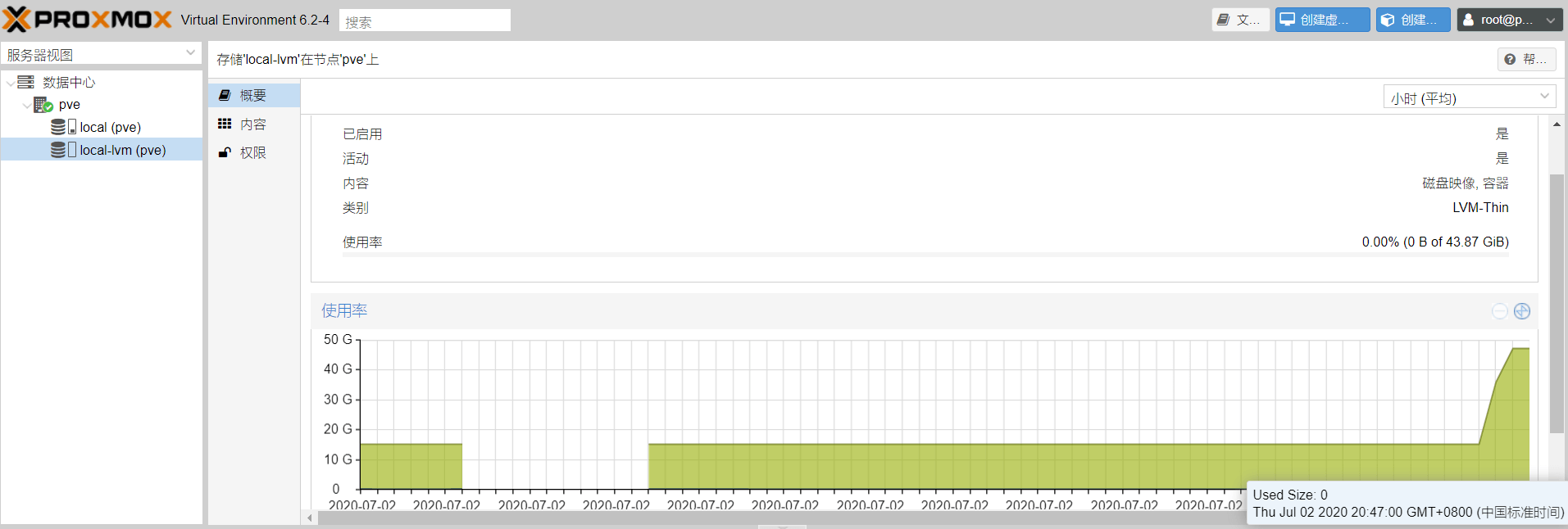
在pve控制端网页也显示正常,增大到43.87G
没有评论